Building a Family AI Chat Bot on Azure with OpenClaw
OpenClaw, an open-source multi-channel chat agent gateway, runs on a single Ubuntu 24.04 Azure VM behind Nginx, deployed via Bicep, with secrets in Azure Key Vault, telemetry in Log Analytics, and model calls to Azure AI Foundry. Base infrastructure lands around $40–60 USD/month plus token usage, kept visible by subscription budget alerts.
This is not a product overview. It is an engineering log from actually building and running OpenClaw on Azure.
Introduction
The original goal was simple: build an AI chat bot my family would actually use. That meant more than just answering questions. It had to run for months without babysitting, connect to Telegram and LINE, use Azure AI Foundry for model access, and still be debuggable when something broke.
Once I started building it, the real questions stopped being "How do I get it running?" and became:
- How do I make deployment repeatable?
- How do I keep secrets out of random files on the VM?
- How do I avoid accidentally exposing the dashboard to the public internet?
- How do I keep GPT costs visible and under control?
This post focuses on the practical answers:
- Why I ended up with the current Azure architecture
- How I modeled the infrastructure in Bicep
- What security decisions mattered most
- How I connected OpenClaw to Azure AI Foundry
- How I monitored usage and controlled spend
For the broader picture across infrastructure, integrations, and plugins, start with the OpenClaw on Azure series overview. If you want to extend this base setup after reading, Teaching OpenClaw to Understand Voice with MAI-Transcribe-1 covers Azure Speech and voice-note transcription, while Teaching OpenClaw to Draw with MAI-Image-2 on Telegram, LINE, and WhatsApp covers image generation and delivery across the same channels.
1. Architecture
I deliberately did not split this into a large number of managed services. For a family-scale workload, the simplest system that is still safe and maintainable is usually the best one.
The final design is one Azure Linux VM running OpenClaw behind Nginx, with Key Vault for secrets, Log Analytics for logs, and Azure AI Foundry for model hosting.
Users (Telegram / LINE / WhatsApp)
                |
                v  HTTPS :443
      [Azure Public IP + NSG]
                |
                v
    [Nginx Reverse Proxy :443]  <- TLS termination, Let's Encrypt certificate
                |
                v
 [OpenClaw Gateway :18789]      <- loopback only, never exposed publicly
                |
      +---------+-------------------+
      |                             |
      v                             v
[Azure Key Vault]          [Azure AI Foundry]
  centralized secrets        GPT-5.2-chat model
      |
      v
[Log Analytics]
  30-day log retention
That layout works because the boundary is explicit. Public traffic only reaches a small set of ports. The actual OpenClaw Gateway never leaves loopback. Model access is delegated to Azure AI Foundry. Secret storage is centralized in Key Vault. Traffic, secrets, models, and host responsibilities stay separate, which makes troubleshooting much more predictable.
Design principles
| Principle | Implementation |
|---|---|
| Gateway is never public | Bind 127.0.0.1:18789 and explicitly deny it in NSG |
| Secrets never live in repo or random files | Store them in Azure Key Vault |
| Infrastructure is reproducible | Define everything in Bicep |
| Only open required ports | 443, 80, and 22 only |
2. Infrastructure as Code with Bicep
Clicking around the Azure Portal works exactly once. The second time, or six months later, it becomes expensive and error-prone. That is why I modeled the entire environment in Bicep from the start.
I split responsibilities into focused modules and let main.bicep compose the final deployment.
2.1 Module layout
infra/bicep/
├── main.bicep                  <- entry point, composes all modules
└── modules/
    ├── vnet.bicep              <- VNet + Subnet
    ├── nsg.bicep               <- NSG rules
    ├── vm-linux.bicep          <- Ubuntu 24.04 VM + public IP + NIC
    ├── keyvault.bicep          <- Key Vault with RBAC
    ├── loganalytics.bicep      <- Log Analytics with 30-day retention
    ├── openai.bicep            <- Azure AI Foundry + model deployments
    └── budget.subscription.bicep <- subscription-level budget alerts
2.2 VNet module (vnet.bicep)
The network layer is intentionally simple: one VNet and one subnet for the VM. The point is not clever topology. It is giving the VM, NIC, and NSG a clear private address space to attach to.
resource vnet 'Microsoft.Network/virtualNetworks@2023-11-01' = {
  name: '${prefix}-vnet'
  location: location
  properties: {
    addressSpace: {
      addressPrefixes: ['10.20.0.0/16']
    }
    subnets: [
      {
        name: '${prefix}-subnet-vm'
        properties: {
          addressPrefix: '10.20.1.0/24'
        }
      }
    ]
  }
}
2.3 NSG module (nsg.bicep)
The NSG is one of the most important layers in the whole design because it defines exactly what the outside world is allowed to see. The rule is simple: allow only what is genuinely required and deny the rest.
// Allow HTTPS for Telegram / LINE webhooks
{ name: 'allow-https-443', priority: 100, destinationPortRange: '443', access: 'Allow' }

// Allow HTTP for Let's Encrypt ACME validation
{ name: 'allow-http-80', priority: 110, destinationPortRange: '80', access: 'Allow' }

// Allow SSH. In production, restrict this to your admin IP.
// Example: sourceAddressPrefix: '203.0.113.10/32'
{ name: 'allow-ssh-22', priority: 120, destinationPortRange: '22', access: 'Allow', sourceAddressPrefix: '<your-admin-ip>/32' }

// Explicitly deny RDP
{ name: 'deny-rdp-3389', priority: 200, destinationPortRange: '3389', access: 'Deny' }

// Explicitly deny public Gateway access
{ name: 'deny-gateway-18789', priority: 210, destinationPortRange: '18789', access: 'Deny' }
2.4 VM module (vm-linux.bicep)
I used Ubuntu 24.04 because OpenClaw, Nginx, SSH, systemd, and debugging all fit naturally on a standard Linux VM. I usually choose between Standard_B2s and Standard_D2s_v5 depending on how much headroom I want.
resource vm 'Microsoft.Compute/virtualMachines@2023-09-01' = {
  name: '${prefix}-vm'
  location: location
  properties: {
    hardwareProfile: { vmSize: vmSize }
    osProfile: {
      computerName: '${prefix}-vm'
      adminUsername: adminUsername
      // SSH keys only, no password auth
      linuxConfiguration: {
        disablePasswordAuthentication: true
        ssh: {
          publicKeys: [
            {
              path: '/home/${adminUsername}/.ssh/authorized_keys'
              keyData: sshPublicKey
            }
          ]
        }
      }
    }
    storageProfile: {
      imageReference: {
        publisher: 'Canonical'
        offer: '0001-com-ubuntu-server-noble'
        sku: '24_04-lts-gen2'
        version: 'latest'
      }
    }
  }
}
2.5 Key Vault module (keyvault.bicep)
Key Vault has a simple but important role: anything genuinely sensitive should stay out of the VM, the repo, and .env files. I used RBAC mode instead of the older Access Policy model because it is more consistent with how Azure permissions work today.
resource kv 'Microsoft.KeyVault/vaults@2023-07-01' = {
  name: '${prefix}kv${uniqueString(resourceGroup().id)}'
  location: location
  properties: {
    sku: { family: 'A', name: 'standard' }
    tenantId: subscription().tenantId
    enableRbacAuthorization: true
    enableSoftDelete: true
    softDeleteRetentionInDays: 7
    publicNetworkAccess: 'Enabled'
  }
}
2.6 Deployment command
Once the modules exist, the actual deployment is straightforward:
source .env.local
export VM_SSH_PUBLIC_KEY="$(cat ~/.ssh/id_ed25519.pub)"

az deployment group create \
  --resource-group "$AZURE_RESOURCE_GROUP" \
  --template-file infra/bicep/main.bicep \
  --parameters infra/bicep/params/prod.bicepparam \
  --parameters sshPublicKey="$VM_SSH_PUBLIC_KEY"
Under the hood, that creates the VNet, NSG, VM, Key Vault, Log Analytics workspace, AI Foundry resources, and budget alerts. Because the whole thing is declarative, later changes go back into Bicep instead of being hand-edited in the Portal.
3. Security model
This is the part I least wanted to compromise on. It is common for side projects to optimize only for "working," then defer security until later. That usually becomes painful technical debt.
3.1 Gateway is loopback-only
The OpenClaw Gateway is never exposed directly. Public traffic terminates at Nginx. Nginx forwards only to a loopback-bound service inside the VM.
[Public Internet] ── NSG Deny :18789 ──> blocked
[Nginx]           ── proxy to :18789 ──> only localhost can reach Gateway
[Admin]           ── SSH tunnel       ──> dashboard access on demand
Admin access is through an SSH tunnel:
ssh -N -L 18789:127.0.0.1:18789 <username>@<your-vm-domain>
# Then open http://127.0.0.1:18789/
3.2 NSG rule layering
Priority 100  - Allow :443   (Telegram/LINE webhook)
Priority 110  - Allow :80    (Let's Encrypt certificate renewal)
Priority 120  - Allow :22    (SSH, must be restricted to your source IP)
Priority 200  - Deny  :3389  (RDP, completely disabled)
Priority 210  - Deny  :18789 (Gateway Dashboard, loopback only)
Priority 65500 - Deny everything else (Azure default)
Security note: if SSH source is left as
*, the VM will be scanned continuously by internet-wide bots. SSH keys make brute-force login ineffective, but the exposure still exists for future SSH CVEs. If you have a fixed IP, restrict port 22 to<your-ip>/32.
3.3 All secrets live in Azure Key Vault
Secret handling follows the same principle: do not scatter secrets. Telegram tokens, LINE secrets, and Azure AI Foundry API keys should not live partly in the repo, partly in shell history, and partly on the VM.
# After deployment, store the AI Foundry API key in Key Vault
uv run oc store-key

# Equivalent az CLI operation:
az keyvault secret set \
  --vault-name "$KV_NAME" \
  --name "azure-openai-api-key" \
  --value "$OPENAI_KEY"
3.4 OpenClaw app-layer hardening
Beyond Azure networking, I also tightened the OpenClaw runtime itself. These settings look small, but they prevent very real mistakes and abuse.
{
  "gateway": {
    "bind": "loopback"
  },
  "channels": {
    "telegram": {
      "configWrites": false,
      "dmPolicy": "pairing",
      "groupPolicy": "allowlist",
      "groupAllowFrom": ["<family-group-id-1>", "<family-group-id-2>"]
    }
  }
}
| Setting | Purpose |
|---|---|
configWrites: false |
Prevent chat-driven config changes |
dmPolicy: pairing |
Unknown users require approval |
groupPolicy: allowlist |
Only approved family groups can use the bot |
3.5 SSH is key-only
There is nothing fancy here: password authentication is disabled entirely. SSH keys only. That is not advanced defense. It is baseline hygiene, but skipping it makes everything else weaker.
4. Cost controls
Getting the system online is one thing. Keeping the monthly bill sane is the real long-term constraint. This is not a high-traffic product, so the goal is not extreme optimization. The goal is to keep the main cost centers visible: VM, storage, logs, and GPT token consumption.
4.1 Estimated monthly cost (UAE North)
| Resource | Example SKU | Estimated monthly cost |
|---|---|---|
| Linux VM | Standard_B2s (2 vCPU, 4 GB RAM) | ~$30–40 |
| OS Disk | Premium SSD P4 (32 GB) | ~$5 |
| Public IP | Standard static | ~$3 |
| Key Vault | Standard | negligible |
| Log Analytics | 30-day retention | usually low for family usage |
| Azure AI Foundry | token-based | depends on usage |
| Base infrastructure total | ~$38–48/month |
LLM cost depends on usage. For light family use, it is usually a few dollars to low double digits per month.
4.2 Three controls that mattered most
1. Subscription budget alerts
resource budget 'Microsoft.Consumption/budgets@2023-11-01' = {
  name: '${prefix}-monthly-budget'
  properties: {
    amount: 150
    timeGrain: 'Monthly'
    notifications: {
      eighty_percent: {
        threshold: 80
        contactEmails: [notificationEmail]
      }
      one_hundred_percent: {
        threshold: 100
        contactEmails: [notificationEmail]
      }
    }
  }
}
2. Scheduled VM startup
I use an Automation Account runbook to start the VM on schedule, which avoids paying for unnecessary runtime.
Connect-AzAccount -Identity
Start-AzVM -ResourceGroupName $ResourceGroup -Name $VMName
3. Token usage monitoring
There are two practical ways to inspect token usage.
Method 1: via OpenClaw CLI on the VM
ssh <username>@<your-vm-domain> 'openclaw status --usage'
Method 2: via Azure AI Foundry metrics
In Azure AI Foundry Portal, go to your Hub and then Metrics. The most useful counters are:
| Metric | Meaning |
|---|---|
TokenTransaction |
Tokens consumed per request |
ProcessedPromptTokens |
Input tokens including system prompt and tools |
GeneratedCompletionTokens |
Output tokens |
TotalTokens |
Combined total, which maps to billing |
You can also use Azure Portal and filter Cost Analysis by Cognitive Services to see actual service spend over time.
Here is the actual weekly Azure cost view from March 8-14. Total spend was GBP 17.64, comfortably under a GBP 150 monthly budget:
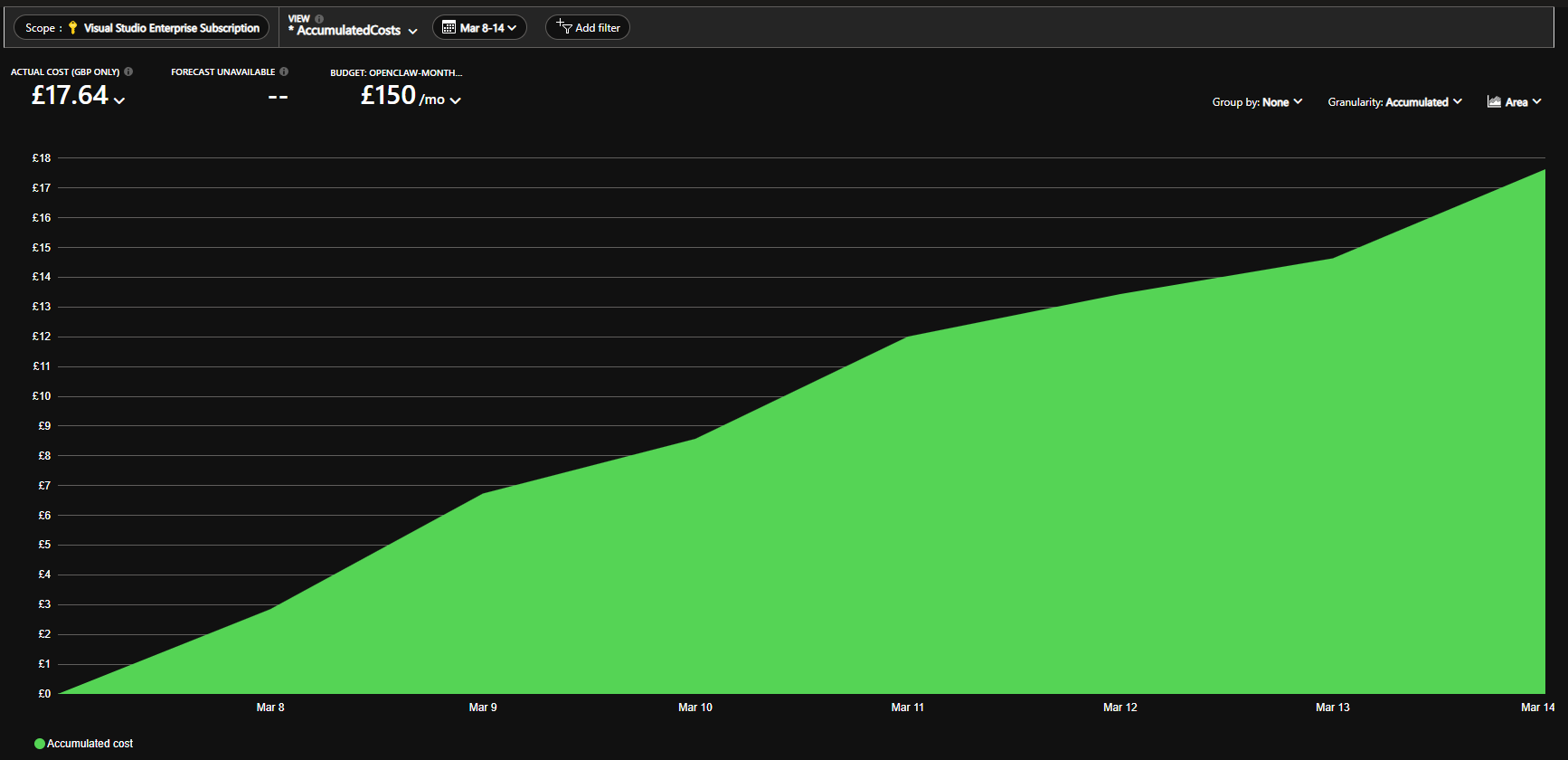
That chart matters because it shows a real cost curve, not just a guess that the system should be cheap. You can see the slope flatten later in the week, which lines up with scheduled VM runtime and the fact that the bot stayed within a family-use pattern.
For model-side usage, the Azure AI Foundry resource-usage chart is even more helpful. Here is the gpt-5dot2-chat deployment over the last 7 days:
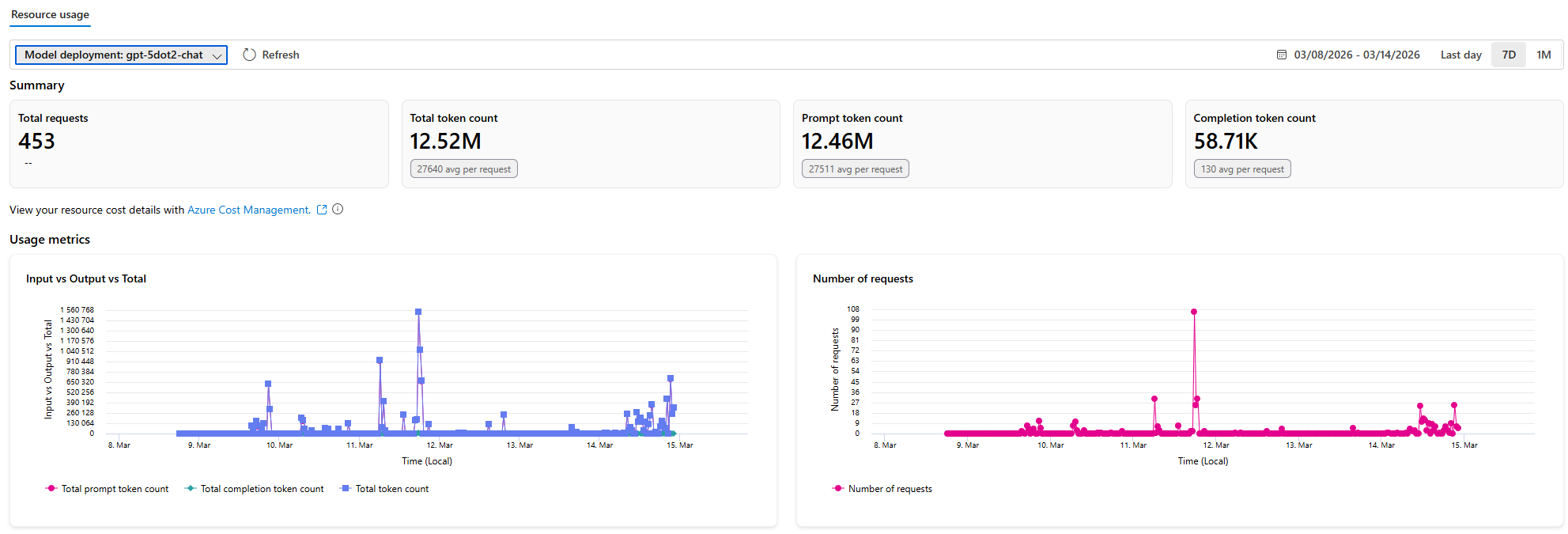
That chart tells a more specific story: 453 requests in 7 days, about 12.52M total tokens, and almost all of them were prompt-side rather than completion-side. Completion tokens were only about 58.71K. In other words, the bigger cost driver was not long model replies. It was system prompts, tool schemas, context, and the agent workflow itself.
Another notable number is the average token count per request: about 27,640 total tokens, with only around 130 completion tokens on average. That is typical for agent-style workloads: a heavy context envelope and a relatively short final answer. If I wanted to optimize cost further, the first place to look would be prompt structure, tool count, and context trimming, not shaving a few words off the assistant's reply.
For request-by-request visibility into which agent step triggered each model call, see add OpenTelemetry tracing for AI Foundry calls.
5. Connecting OpenClaw to Azure AI Foundry
Without a stable model integration the bot does nothing useful. Here is how I wired OpenClaw to Azure AI Foundry.
5.1 Deploying AI Foundry resources with Bicep
I used kind: AIServices rather than the older kind: OpenAI resource style. That lines up better with the current Azure AI Foundry model and fits more naturally with Hub/Project-based management. Azure AI Foundry is the current unified Azure platform for hosting OpenAI and other models; the legacy Azure OpenAI Service (kind: OpenAI) is being folded into it, so new deployments should target Foundry.
openai.bicep creates three main resource types:
// 1. AIServices account, not legacy kind: OpenAI
resource openai 'Microsoft.CognitiveServices/accounts@2024-10-01' = {
  name: '${prefix}-foundry-${unique}'
  location: location
  kind: 'AIServices'
  sku: { name: 'S0' }
  properties: {
    customSubDomainName: '${prefix}-foundry-${unique}'
    publicNetworkAccess: 'Enabled'
    disableLocalAuth: false
  }
}

// 2. Model deployments
resource deployments 'Microsoft.CognitiveServices/accounts/deployments@2024-10-01' = [
  for deployment in modelDeployments: {
    parent: openai
    name: deployment.name
    sku: {
      name: 'GlobalStandard'
      capacity: 10
    }
    properties: {
      model: {
        format: 'OpenAI'
        name: 'gpt-5.2-chat'
        version: '2026-02-01'
      }
    }
  }
]

// 3. AI Foundry Hub for portal-side tracking and management
resource hub 'Microsoft.MachineLearningServices/workspaces@2024-10-01' = {
  name: '${prefix}-hub-${unique}'
  kind: 'Hub'
  identity: { type: 'SystemAssigned' }
  properties: {
    storageAccount: storage.id
    publicNetworkAccess: 'Enabled'
  }
}
5.2 Deployment flow
I do not rely on a single deployment. I keep a primary and a failover model so the system degrades more gracefully when one deployment is throttled or temporarily unhealthy.
param openaiLocation = 'swedencentral'
param openaiModelDeployments = [
  {
    name: 'gpt-5dot2-chat'
    modelName: 'gpt-5.2-chat'
    modelVersion: '2026-02-10'
    skuName: 'GlobalStandard'
    skuCapacity: 100
  }
  {
    name: 'gpt-5.3-chat'
    modelName: 'gpt-5.3-chat'
    modelVersion: '2026-03-03'
    skuName: 'GlobalStandard'
    skuCapacity: 150
  }
]
After deployment, both model deployments are visible inside AI Foundry and can be referenced by the same OpenClaw provider definition.
az deployment group create \
  --resource-group "$AZURE_RESOURCE_GROUP" \
  --template-file infra/bicep/main.bicep \
  --parameters infra/bicep/params/prod.bicepparam
5.3 Store the API key in Key Vault
Once the resources exist, the next step is not editing OpenClaw config directly. The next step is putting the API key into Key Vault in a clean, repeatable way.
# Use a script to fetch the API key and store it in Key Vault
uv run oc store-key

# Equivalent az CLI operation:
OPENAI_KEY=$(az cognitiveservices account keys list \
  -g "$AZURE_RESOURCE_GROUP" -n "$OPENAI_ACCOUNT_NAME" \
  --query key1 -o tsv)

az keyvault secret set \
  --vault-name "$KV_NAME" \
  --name "azure-openai-api-key" \
  --value "$OPENAI_KEY"
5.4 OpenClaw provider configuration
This is the part where Azure AI Foundry is easiest to get wrong. It exposes an OpenAI-compatible API, but the auth behavior is not identical to the public OpenAI platform. A lot of examples assume Bearer auth, which is the wrong shape here.
{
  "models": {
    "providers": {
      "azure-openai-responses": {
        "api": "openai-responses",
        "baseURL": "https://<resource-name>.openai.azure.com/openai/v1",
        "apiKey": "<API_KEY>",
        "authHeader": false,
        "headers": {
          "api-key": "<API_KEY>"
        },
        "compat": {
          "supportsStore": false
        }
      }
    }
  },
  "agents": {
    "defaults": {
      "models": {
        "primary": "azure-openai-responses/gpt-5.2-chat",
        "failover": [
          "azure-openai-responses/gpt-5.3-chat"
        ],
        "streaming": false
      }
    }
  }
}
The failover logic is straightforward: if gpt-5.2-chat returns something like a 429 from TPM limits or a temporary 5xx, OpenClaw can retry against gpt-5.3-chat. To end users this is often invisible. Operationally it adds a useful buffer.
Important:
authHeader: falseplusheaders.api-keyis required. Azure AI Foundry does not acceptAuthorization: Bearer <key>for this integration path. The key needs to appear both inapiKeyand in the explicitapi-keyheader.
5.5 Automating VM configuration
I wrapped the VM-side setup in a script instead of editing JSON by hand over SSH every time:
uv run oc configure-openai \
  "$VM_IP" \
  "$OPENAI_ENDPOINT" \
  "$OPENAI_KEY" \
  "gpt-5.2-chat"
The script does three things:
- Backs up the current
openclaw.json - Merges the provider settings over SSH
- Restarts the Gateway so the new config takes effect
5.6 Known issue: streaming must stay off
The most annoying integration pitfall was Azure OpenAI Responses API streaming. When stream: true and the request includes function_call_output items, the API can fail. Setting stream: false avoids the problem.
{
  "agents": {
    "defaults": {
      "models": {
        "streaming": false
      }
    }
  }
}
So I took the conservative route: disable streaming and optimize for stability. The trade-off is losing token-by-token rendering in the UI, but not correctness or core functionality.
6. Full architecture diagram
One-paragraph summary: public traffic hits Nginx, the actual service stays on loopback, secrets live in Key Vault, and model inference lives in Azure AI Foundry.
Users (Telegram / LINE / WhatsApp)
                |
                v  HTTPS :443
      [Azure Public IP + NSG]
                |
                v
    [Nginx Reverse Proxy :443]  <- TLS termination, Let's Encrypt certificate
                |
                v
 [OpenClaw Gateway :18789]      <- loopback only, never exposed publicly
                |
      +---------+-------------------+
      |                             |
      v                             v
[Azure Key Vault]          [Azure AI Foundry]
  centralized secrets        GPT-5.2-chat model
      |
      v
[Log Analytics]
  30-day log retention
7. Smoke testing
After deployment, I do not trust the Azure Portal alone. I run a smoke test against the actual running bot.
uv run oc smoke-test <your-vm-domain>
Expected output looks like this:
=== 1/3  Gateway /health ===
{"ok":true,"status":"live"}
gateway: OK

=== 2/3  Channel probes ===
channels OK: telegram, line

=== 3/3  Reminder plugin ===
reminder plugin: loaded

smoke-test: PASS
For the design and code behind that final probe, see how the reminder plugin is built.
Summary
| Area | Approach |
|---|---|
| Infrastructure | 100% Bicep IaC |
| Security | loopback-only Gateway, Key Vault secrets, minimal NSG exposure, SSH key-only |
| Cost | budget alerts, VM scheduling, token monitoring |
| AI model integration | Azure AI Foundry with an OpenClaw azure-openai-responses provider |
Looking back, the architecture is not flashy. That is the point. It is intentionally constrained: no overbuilt cloud topology, no delayed security work, and no hand-maintained model config hiding on one VM. Bicep makes deployment repeatable. Key Vault and NSG enforce the boundaries. Azure AI Foundry provides the model layer. Budget alerts and usage monitoring keep the bill visible.
If your goal is similar to mine, a household-scale AI bot that stays online, remains understandable, and does not turn into a maintenance trap, this architecture is a practical path. In practice, the base infrastructure lands roughly in the $40-60 USD per month range, plus model usage.